
Accounts
How do I check my account balance?
You can check your account balance online, at a branch, over the phone, or through live chat.
- Log in to Hills Bank Online through an internet browser or the Hills Bank mobile app. Your accounts will be listed on the home screen with your current balance. Select an account to view more details, including completed and pending transactions.
- Stop by any Hills Bank office to receive a printout of your balance
- Call our Customer Contact Center at 1-800-445-5725 (1-800-HILLSBK) to hear your balance over the phone.
- Chat with a banker online at hillsbank.com or in the Hills Bank mobile app.
Haven't signed up for Hills Bank Online yet?
Hills Bank Online is easy to use and gives you greater control of your finances, while providing convenience and security with access to your accounts 24/7. Sign up for Hills Bank Online today!
Learn more about Hills Bank Online features.
Need access to your accounts on-the-go?
Download the Hills Bank mobile app on the Apple App Store or Google Play Store to get started.


What is my account number?
For security, we never share full account numbers by email or phone – so here's where to find yours.
- Log into Hills Bank Online
- Select your account from the home screen
- Select Details & Settings (next to Transactions) to view your full account number.
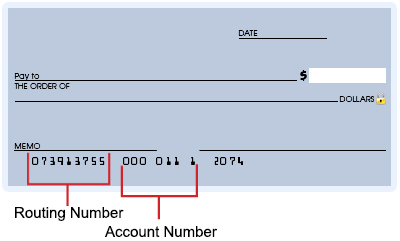
You can also find your account number on the bottom of your checks, if applicable.
What's the difference between balance and available balance?
Your account balance is the total amount of money that is currently in your account.
Your available balance is the total amount of money in your account that is accessible for purchases and withdrawals. The available balance subtracts account transactions that have been authorized, but have not yet settled and been paid, and holds placed on deposits that have not yet cleared.
You can keep tabs on your available balances by signing up for Hills Bank Online, our online and mobile banking service.
See your account balance on the go!
Download the Hills Bank mobile app to get started.
When will money from a check be available?
Our general policy is to make funds from your cash and check deposits available to you on the first business day after the day we receive your deposit. You can view your current account balance and any pending transactions by logging into Hills Bank Online on your browser or through the Hills Bank mobile app.
What should I do if my account has a negative balance?
There are several ways to resolve a negative balance. You can stop by one of our offices, mail a deposit, or use mobile deposit to provide enough funds to offset a negative balance.
If you have any questions pertaining to the balance on the account, please get in touch with us.
Questions? We’re here to help.
- Chat: Click the chat bubble on hillsbank.com or in the Hills Bank mobile app to connect with a banker during business hours.
- Call: Reach our Customer Contact Center at 1-800-445-5725 (1-800-HILLSBK), Monday – Friday, 7 a.m. – 6 p.m.; Saturday, 8 a.m. – noon.
- Stop by: Visit any Hills Bank location near you.
You can also ask a banker about Hills Bank products that can help prevent your account from having a negative balance.
What overdraft options do you offer?
We offer opt-in overdraft options for checking accounts that help you avoid declined transactions and returned payments in case you spend more than your available account balance. Stop by any of our locations, call 1-800-445-5725 (1-800-HILLSBK), or chat with a banker online at hillsbank.com or in the Hills Bank mobile app and we'll help you pick the option that fits how you bank.
Can I open an account online?
You can apply for and open a new Hills Bank account entirely online. It's quick, easy, and secure! Already have an account with us? You can use another account to help build your savings over time. Review our options below:
- Checking: Make everyday purchases with ease using a customizable debit card along with advanced online banking
- Savings: Accounts with a variety of options to help you reach your goals
- Money Market: Can earn higher interest rates than savings accounts with some flexibility for withdrawals and transfers
- Certificate of Deposit: Deposit a set amount of money for a fixed amount of time to receive a certain amount of interest on top of your balance
Questions? We’re here to help.
- Chat: Click the chat bubble on hillsbank.com or in the Hills Bank mobile app to connect with a banker during business hours.
- Call: Reach our Customer Contact Center at 1-800-445-5725 (1-800-HILLSBK), Monday – Friday, 7 a.m. – 6 p.m.; Saturday, 8 a.m. – noon.
- Stop by: Visit any Hills Bank location near you.
We look forward to serving you!
Is there a minimum balance required for a checking account?
We offer a variety of checking accounts with different features and requirements to match our customers' needs. Some checking accounts do require a minimum balance to avoid fees, but we also offer several with no minimum balance required.
Do I need to make a minimum number of deposits in my checking/savings account each month?
Most of our checking and savings accounts do not require a minimum number or amount of deposits each month. However, some do require a direct deposit or a minimum deposit during each monthly statement cycle, such as our High Interest Checking Account or our UI Employee Advantage Checking/Savings Accounts*.
*Direct deposit of paycheck is required. Limit of one UI Employee Advantage account type per individual. If direct deposit from the University of Iowa is discontinued, the account converts to Free Checking/Savings, respectively.
How do I change my address or any other contact information?
There are multiple ways to change your contact information on file with Hills Bank.
1.) Online*
*Personal banking customers only. Business customers: please use the alternate methods below
You can log into Hills Bank Online and make changes to your contact information in your profile.
- On the navigation bar, open Profile
- Select Contact Info
- You can also change other contact information under Contact Info such as your phone number
2.) In Person
You can stop by a branch and meet with us personally. Please bring a photo ID such as a driver's license for identification.
3.) Over the Phone
You can call our Customer Contact Center at 1-800-445-5725 (1-800-HILLSBK). You will be asked questions to verify your identity.
- Customer Contact Center hours: Monday - Friday, 7 a.m. - 6 p.m.; Saturday 8 a.m. - noon
4.) Chat With Us
Start a text chat with one of our bankers on hillsbank.com or the Hills Bank mobile app. Just click the chat bubble!
We may request photo ID or ask questions to verify your identity. Please also let us know if there are others in your household affected by these changes, so that we may update their records as well.
How do I change my name on file?
For a name change, we will need documentation with your new name, such as:
- Updated driver's license or state non-driver ID
- Marriage certificate
- Court documents
You can initiate the name change in multiple ways:
- Chat: Click the chat bubble on hillsbank.com or in the Hills Bank mobile app to connect with a banker during business hours.
- Call: Reach our Customer Contact Center at 1-800-445-5725 (1-800-HILLSBK), Monday – Friday, 7 a.m. – 6 p.m.; Saturday, 8 a.m. – noon.
- Stop by: Visit any Hills Bank location near you.
You will be asked to complete an updated Tax ID Number Certification and provide an updated signature. If you initiate the request in a manner other than in person, we will follow up with you to obtain copies of the necessary documents.
How do I add a joint owner or beneficiary to my account?
Visit any Hills Bank location with the person you'd like to add (they'll need a valid photo ID), and we'll update your account together – it usually takes just a few minutes. We can also add a payable-on-death beneficiary for your loved ones. If you're thinking through bigger questions about your estate, our Trust & Wealth Management team is here to help with that conversation too.
Start the conversation:
- Chat: Click the chat bubble on hillsbank.com or in the Hills Bank mobile app to connect with a banker during business hours.
- Call: Reach our Customer Contact Center at 1-800-445-5725 (1-800-HILLSBK), Monday – Friday, 7 a.m. – 6 p.m.; Saturday, 8 a.m. – noon.
- Stop by: Visit any Hills Bank location near you.
What do I do with a loved one's account after they pass away?
First – we're sorry for your loss, and we'll make this part as simple as we can. Bring a certified copy of the death certificate to any Hills Bank location, and we'll guide you through the next steps based on how the account was set up. Every situation is a little different, so there's no need to have it all figured out before you come in.
How do I close an account?
We'd hate to see you go, but we'll make it easy. Stop by any of our locations, call us at 1-800-445-5725 (1-800-HILLSBK) Monday – Friday, 7 a.m. – 6 p.m.; Saturday, 8 a.m. – noon, or reach a banker through the chat bubble on hillsbank.com or Hills Bank Online.
Debit Cards & ATMS
What do I do if I lost my ATM/Debit card?
The first thing you should do if you have lost or misplaced your card is to turn it off.
- Logging into Hills Bank Online on your desktop or mobile app
- Selecting Features on the navigation bar, followed by Turn Debit Card On/Off
- Select a card to turn it off
If you later find the card and want to turn it back on, just repeat the process.
After turning your card off, please contact our Customer Contact Center. We’re available by calling 1-800-445-5725 (1-800-HILLSBK) or by live chat with a banker on hillsbank.com. We will cancel and reissue your card.
- Customer Contact Center hours: Monday – Friday, 7 a.m. – 6 p.m.; Saturday, 8 a.m. – noon
If you’ve lost your credit card:
Call 1-800-423-7503 or visit www.MyCardStatement.com. For lost or stolen ATM/Debit Cards after hours, call 1-833-773-8204.
My card has been "blocked." What can I do?
If your transaction or card has been blocked, please call our Customer Contact Center at 1-800-445-5725 (1-800-HILLSBK).
- Call: Monday - Friday, 7 a.m. - 7 p.m.; Saturday 8 a.m. - noon
- Chat: Click the chat bubble on hillsbank.com or in the Hills Bank mobile app to connect with a banker during business hours.
For a lost or stolen credit card after hours, call 1-800-423-7503.
For a lost or stolen ATM/debit card after hours, call 1-833-773-8204.
In order to help protect against card fraud, when you attempt to use your debit card for a transaction, that transaction is evaluated against a variety of factors that may include such information as type of purchase, proximity to cardholder address, similarity to regular spending patterns, etc. If the transaction meets certain criteria, the individual transaction could be declined, or the card could be blocked until the card's ownership can be verified.
You can reduce the likelihood of your card being blocked by mistake by letting us know of your travel plans. Simply click the chat bubble on hillsbank.com or in the Hills Bank mobile app during business hours to connect with a banker!
My card isn't working. Whom should I call?
There could be a number of reasons your card is not working - an issue with our processor, an issue with the merchant, an issue with your card plastic, an issue with your account, etc. Please contact our Customer Contact Center at 1-800-445-5725 (1-800-HILLSBK) to resolve the issue.
- Chat: Click the chat bubble on hillsbank.com or in the Hills Bank mobile app to connect with a banker during business hours.
- Call: Monday - Friday, 7 a.m. - 7 p.m.; Saturday 8 a.m. - noon (Central Time)
For a lost or stolen credit card after hours, call 1-800-423-7503.
For lost or stolen ATM/Debit Cards after hours, call 1-833-773-8204.
Why are my debit transactions being denied?
There are several reasons that a debit card could be denied, or that your online transactions aren't going through successfully. To help resolve your specific issue, please get in touch with us:
In Person: Stop by a Hills Bank location near you.
By Phone: Call our Customer Contact Center at 1-800-445-5725 (1-800-HILLSBK)
- Customer Contact Center hours: Monday - Friday, 7 a.m. - 7 p.m.; Saturday 8 a.m. - noon
Through Chat: Use the chat bubble on hillsbank.com or after logging into Hills Bank Online to connect directly with a banker during normal business hours.
What should I do if I am out of town and my credit or debit card is declined?
There could be many reasons why this is happening. Please get in touch and we’ll figure it out together:
Questions? We’re here to help.
- Chat: Click the chat bubble on hillsbank.com or in the Hills Bank mobile app to connect with a banker during business hours.
- Call: Reach our Customer Contact Center at 1-800-445-5725 (1-800-HILLSBK), Monday - Friday, 7 a.m. - 6 p.m.; Saturday 8 a.m. - noon
- Stop by: Visit any Hills Branch location near you.
For a lost or stolen credit card after hours, call 1-800-423-7503.
For lost or stolen ATM/Debit Cards after hours, call 1-833-773-8204.
Always remember to notify Hills Bank prior to using your card abroad, or even if you are traveling outside of your normal range in the U.S. so we can set a travel alert on your account and help ensure a smooth experience when you use your card in those regions.
What should I do if I've forgotten my debit card PIN?
If you've forgotten your PIN – or if you need to change it for another reason – call 1-800-717-4923 and follow the prompts to select a new PIN.
You will need to have your debit card and your Social Security number on hand when you call to establish your new PIN. Once you've set your new PIN, you can activate it by paying for a transaction or using your card at an ATM.
Protect your PIN
Your PIN should be a four-digit number that you can remember but no one else can guess easily. Never write your PIN on your card.
Have you received a new debit card?
When you receive a new card, please destroy the old card as soon as you have activated the new one.
How do I activate my debit card or change its PIN?
To activate your debit card, call SHAZAM® at 1-800-717-4923 and follow the prompts that guide you through the process. You will need to have your debit card and your Social Security Number on-hand when you call to establish your new PIN. Then use your new card with its PIN to complete a transaction, or check your balance at a Hills Bank ATM.
To set/change your PIN, call SHAZAM® at 1-800-717-4923 and following the prompts to select a new PIN to replace the old one.
Don't have a PIN for your new card yet?
Establishing a Personal Identification Number (PIN) for your new debit card is easy. Simply call SHAZAM® at 1-800-717-4923 and follow the prompts that guide you through the process. You will need to have your debit card and your Social Security Number on-hand when you call to establish your new PIN.
You can also change the PIN on your debit card at any time by calling 1-800-717-4923 and following the prompts to select a new PIN to replace the old one.
Having issues with your card?
If you are unable to use your debit card after activating it, please chat with us or give our Customer Contact Center a call at 1-800-445-5725 (1-800-HILLSBK):
- Customer Contact Center hours: Monday – Friday, 7 a.m. – 6 p.m.; Saturday, 8 a.m. – noon
- Chat: Click the chat bubble on hillsbank.com or in the Hills Bank mobile app to connect with a banker during business hours.
Security is important.
When you receive a new card, please destroy the old card as soon as you have activated the new one.
Protect your PIN.
Your PIN should be a four-digit number that you can remember but no one else can guess easily. Never write your PIN on your card.
To report a lost or stolen card, please chat with us or call our Customer Contact Center at 1-800-445-5725 (1-800-HILLSBK):
- Customer Contact Center hours: Monday – Friday, 7 a.m. – 6 p.m.; Saturday, 8 a.m. – noon
- Chat: Click the chat bubble on hillsbank.com or in the Hills Bank mobile app to connect with a banker during business hours.
For a lost or stolen credit card after hours, call 1-800-423-7503.
For lost or stolen ATM/Debit Cards after hours, call 1-833-773-8204.
Can I use my debit card while traveling internationally?
Yes, your debit card and credit card are accepted internationally!
If your ATM card is linked to a checking account, it can also be used at ATMs internationally. Always notify Hills Bank prior to using your card abroad, or even if you are traveling outside of your normal range in the U.S. so we can set a travel alert on your account and help ensure a smooth experience when you use your card in those regions.
Important: use your PIN when traveling with your debit card. Using your PIN can help you avoid charges for VISA international debit transactions. If possible, use your card itself rather than a mobile wallet to avoid interruptions.
Get cash from MoneyPass ATMs without fees! (The owner of an ATM may surcharge).
Questions? We’re here to help.
- Chat: Click the chat bubble on hillsbank.com or in the Hills Bank mobile app to connect with a banker during business hours.
- Call: Reach our Customer Contact Center at 1-800-445-5725 (1-800-HILLSBK), Monday – Friday, 7 a.m. – 6 p.m.; Saturday, 8 a.m. – noon.
- Stop by: Visit any Hills Bank location near you.
Before traveling abroad, please refer to our fee schedule for card use outside of the United States.
What is the maximum amount I can withdraw from an ATM in one day?
The maximum daily withdrawal limit from an ATM is typically $510.00 ($110 for GO! Checking). If you need to withdraw more than this amount, please visit a Hills Bank office near you.
Need to access an ATM outside of the Eastern Iowa Corridor? You can use your Hills Bank debit card to get cash, transfer funds, or check your balance from thousands of SHAZAM® and MoneyPass ATMs around the country without surcharge.
How do ATM deposits work?
You can deposit cash or checks at a variety of ATMs across our local service area and at SHAZAM® or MoneyPass ATMs around the country. To find a deposit-taking ATM near you, please use our ATM locator.
Our policy is to make funds from your cash and check deposits available to you on the first business day after the day we receive your deposit. For example, if you make a deposit at an ATM before 6 p.m. on a business day that Hills Bank locations are open, we will consider that day to be the day of your deposit. However, if you make a deposit at an ATM after 6 p.m. or on a day we are not open, we will consider the deposit made on the next business day we are open.
Funds from any deposits (cash or checks) made at ATMs that Hills Bank does not own or operate may not be available until the fourth business day after the day of your deposit.
You can also make remote check deposits using Hills Bank mobile.
Download Hills Bank mobile on the Apple App Store or Google Play to gain access to remote check deposit and a variety of other online banking features.
Is there a fee to use the ATM?
You will not be charged an ATM fee for using any Hills Bank branch or ATM, or any ATM in the MoneyPass® Network.
However, certain ATM transactions may be charged a fee – like overdraft, nonsufficient funds (NSF), or automatic transfer for overdraft from deposit accounts. View our fee schedule to learn more.
How much does it cost to replace my debit card?
There is no fee to replace lost debit cards. You can get a replacement card sent to you by visiting any of our locations, using the chat bubble on hillsbank.com or the Hills Bank mobile app, or by giving our Customer Contact Center a call at 1-800-445-5725 (1-800-HILLSBK).
- Customer Contact Center hours: Monday - Friday, 7 a.m. - 6 p.m.; Saturday 8 a.m. - noon
For a lost or stolen credit card after hours, call 1-800-423-7503.
For lost or stolen ATM/Debit Cards after hours, call 1-833-773-8204.
When will I receive my replacement debit card in the mail?
New cards typically arrive in the second or third week of the month in which they expire – and your card is valid through the end of the expiration month printed on it.
Replacement debit cards are automatically reordered for expiring debit cards to the address we have on file.
If you need to request a new debit card for other reasons, please get in touch with us. Once the order is placed, you can expect your new card in 7-10 business days.
- Chat: Click the chat bubble on hillsbank.com or in the Hills Bank mobile app to connect with a banker during business hours.
- Call: Reach our Customer Contact Center at 1-800-445-5725 (1-800-HILLSBK), Monday - Friday, 7 a.m. - 6 p.m.; Saturday 8 a.m. - noon
- Stop by: Visit any Hills Branch location near you.
How do I add my debit or credit card to Apple Pay?
Open the Wallet app on your iPhone or the Google Wallet app on your Android device, tap to add a card, and follow the prompts to enter or scan your Hills Bank debit card. We'll verify it's really you, and then you're set with tap to pay at checkout, no card required. If you hit a snag during setup, give us a call at 1-800-445-5725 (1-800-HILLSBK), we’ll be happy to help!
Is it safe to use my debit card with a digital wallet?
Yes! Digital wallets like Apple Pay and Google Pay never share your actual card number with the merchant. Instead, they use a unique encrypted code for each purchase, and every transaction requires your fingerprint, face, or passcode to approve. Your card details stay locked down, even if your phone doesn't.
How do I change or personalize the design on my card?
With our Picture Perfect program, your card can be as unique as you want it to be. Design your own Visa® credit or debit card with a photo of your family, friends, pets, or company logo – the possibilities are endless! Or pick a favorite from our Picture Perfect card gallery.
Questions? We’re here to help.
- Chat: Click the chat bubble on hillsbank.com or in the Hills Bank mobile app to connect with a banker during business hours.
- Call: Reach our Customer Contact Center at 1-800-445-5725 (1-800-HILLSBK), Monday - Friday, 7 a.m. - 6 p.m.; Saturday 8 a.m. - noon
- Stop by: Visit any Hills Branch location near you.
Fees & Rates
What are your fees?
You can find our current fee schedule here.
If you have a question about fees, or anything else, feel free to reach out.
Questions? We’re here to help.
- Chat: Click the chat bubble on hillsbank.com or in the Hills Bank mobile app to connect with a banker during business hours.
- Call: Reach our Customer Contact Center at 1-800-445-5725 (1-800-HILLSBK), Monday – Friday, 7 a.m. – 6 p.m.; Saturday, 8 a.m. – noon.
- Stop by: Visit any Hills Bank location near you.
What are your overdraft and NSF fees?
You can find our current fee schedule here.
If you have a question about fees, or anything else, feel free to reach out. You can visit your local Hills Bank office, call us at 1-800-445-5725 (1-800-HILLSBK), or click the chat bubble on hillsbank.com or in the Hills Bank mobile app to connect with a banker during business hours.
What are the current auto loan rates?
For our current auto loan rates, visit HillsBank.com/personal/loans/rates please call 1-800-445-5725 (1-800-HILLSBK) to visit with a Personal Banker or stop by any Hills Bank location.
Whether you’re looking to purchase or refinance a car, boat, or RV, Hills Bank offers a full variety of personal loans to meet your needs.
We offer an easy application process – either in person, over the phone, or in online banking (for current customers).
- Chat: Click the chat bubble on hillsbank.com or in the Hills Bank mobile app to connect with a banker during business hours.
- Call: Reach our Customer Contact Center at 1-800-445-5725 (1-800-HILLSBK), Monday – Friday, 7 a.m. – 6 p.m.; Saturday, 8 a.m. – noon.
- Stop by: Visit any Hills Bank location near you.
Wondering how much you can afford?
Use our convenient Personal Financing calculator to estimate your monthly payments!
Already have a car loan with another lender?
We may be able to lower your monthly payments with our simple refinance process. Find out if you can save by switching today.
What does APY Stand for?
APY stands for annual percentage yield – the total interest you’ll earn on a deposit account over one year, including compounding. It’s different from the plain interest rate because compounding means you earn interest on the interest you’ve already received, so APY gives you the truest picture of what your money will earn. Curious what your savings could do? View our current interest and APY rates, or read our full explainer on how compounding works.
What is the fee for cashier's checks?
You can view our current official cashier's check fee here.
Stop by one of our locations to purchase your cashier's check today!
Please note: all fees are subject to change.
Questions? We’re here to help.
- Chat: Click the chat bubble on hillsbank.com or in the Hills Bank mobile app to connect with a banker during business hours.
- Call: Reach our Customer Contact Center at 1-800-445-5725 (1-800-HILLSBK), Monday – Friday, 7 a.m. – 6 p.m.; Saturday, 8 a.m. – noon.
- Stop by: Visit any Hills Bank location near you.
Is there a fee for money orders or official checks?
Yes, please refer to our Fee Schedule for detailed pricing information.
Along with money orders/official checks, we also offer a variety of branch services for our customers. Learn more.
Questions? We’re here to help.
- Chat: Click the chat bubble on hillsbank.com or in the Hills Bank mobile app to connect with a banker during business hours.
- Call: Reach our Customer Contact Center at 1-800-445-5725 (1-800-HILLSBK), Monday – Friday, 7 a.m. – 6 p.m.; Saturday, 8 a.m. – noon.
- Stop by: Visit any Hills Bank location near you.
How much will it cost to make a stop payment on a check?
You can view the stop payment fee(s) on our current fee schedule.
There are a few ways you can place a stop payment on a check (to cancel the check before it has been paid):
- Log into Hills Bank Online and select Features followed by Stop Payment
- Or get in touch with us:
- Chat: Click the chat bubble on hillsbank.com or in the Hills Bank mobile app to connect with a banker during business hours.
- Call: Reach our Customer Contact Center at 1-800-445-5725 (1-800-HILLSBK) from Monday - Friday, 7 a.m. - 7 p.m.; Saturday 8 a.m. - noon.
- Stop by: Visit any Hills Bank location near you.
What is the fee for sending domestic or international wires?
You can view our fee for sending domestic or international (foreign) wire transfers on our Fee Schedule.
Find more information about sending wire transfers here.
Questions? We’re here to help.
- Chat: Click the chat bubble on hillsbank.com or in the Hills Bank mobile app to connect with a banker during business hours.
- Call: Reach our Customer Contact Center at 1-800-445-5725 (1-800-HILLSBK), Monday – Friday, 7 a.m. – 6 p.m.; Saturday, 8 a.m. – noon.
- Stop by: Visit any Hills Bank location near you.
How do you determine exchange rates for foreign transactions?
Exchange rates are calculated in global currency markets, which fluctuate often. If you have questions about a particular foreign currency transaction, feel free to connect with a banker by visiting your local Hills Bank office, calling us at 319-679-2118.
You can use your Hills Bank debit or credit card while traveling internationally. If using a debit card, be sure to use it with the PIN where possible. Don't forget to call our Customer Contact Center or connect with a banker through the chat bubble on hillsbank.com or in the Hills Bank mobile app to place a travel notice for yourself and others in your household who will be traveling with you and using a Hills Bank card.
If you are traveling abroad, please refer to our fee schedule for card use outside of the United States before you depart!
Forms, Statements, & Documents
How do I sign up for online statements?
To sign up, start by enrolling in Hills Bank Online. Once you've enrolled (or if you're enrolled already):
- Log into Hills Bank Online
- Select the Features tab on the navigation bar
- Select Sign Up For & View Statements under the Account Services section to sign up for online statements and follow the instructions.
Once you've signed up, you can access your statements by selecting Sign Up For & View Statements. Statements are also available via the Quick Links section of the online banking dashboard/home screen. You will receive an email when a statement or notice is available.
Since the information is electronic, you can access it at any time. You may print statements out for your own records if you wish.
If you are not enrolled in online statements you will receive your statement in the mail at the address for your account.
Why sign up for online statements?
- Fast and convenient: Your online statements will arrive sooner than traditional paper statements, and can be viewed from any device.
- Reduce waste: help reduce the amount of paper that is printed
- Secure: Hills Bank Online provides a secure viewing environment
Where can I find my electronic statements?
To access your electronic statements:
- Log into Hills Bank Online
- Open the "Services" tab on the left-hand navigation bar
- Click on "Statements" to see a list of your monthly electronic statements
You can also see statements under the Quick Links section on your online banking dashboard/home screen.
You can access up to 36 months of your eDelivery Statements by logging into your Online Banking account.
Sign up for eDelivery Statements today!
Here are some reasons you should consider enrolling:
- Fast and convenient – eDelivery Statements arrive sooner than traditional paper statements, and can be viewed from any device
- Reduce waste – help reduce the amount of paper that is printed
- Secure – online banking is a safe interface by which you can access your statement
To sign up, enroll in Hills Bank Online today!
Can I get a printout of my statement over the Internet?
If you are already enrolled in eStatements, you can print out your statement anytime by logging into Hills Bank Online. You will receive an email when new statements are available.
To access your electronic statements:
- Log into Hills Bank Online
- Select "Statements" from the Quick Links section on the home screen.
Alternately, you can find Statements under the "Features" section of the menu.
Please note: we will store up to 36 months’ worth of statements for your review. If you would like a copy of a statement prior to this timeframe, you may need to contact a customer service representative, or stop into a branch location.
Sign up for electronic statements today!
Here are some reasons you should consider enrolling:
- Fast and convenient-- Statements arrive sooner than traditional paper statements, and can be viewed from any device.
- Reduce waste--help reduce the amount of paper that is printed
- Secure -- online banking is a safe interface by which you can access your statement.
To sign up, enroll in Hills Bank Online today!
Where can I access tax forms online?
At this time, you cannot directly access your Hills Bank tax forms (such as your 1099 or 1099-INT) online. However, there are a few ways you can obtain a reprint of tax forms issued by Hills Bank:
1.) Via Mail
If you are eligible to receive tax forms from Hills Bank, we will send them to your address on file no later than January 31st.
2.) In Person
You can stop by a branch and meet with us personally to receive a print-out of your tax forms. Please bring a photo ID such as a driver's license for identification.
Need assistance? You will be asked questions to verify your identity.
Questions? We’re here to help.
- Chat: Click the chat bubble on hillsbank.com or in the Hills Bank mobile app to connect with a banker during business hours.
- Call: Reach our Customer Contact Center at 1-800-445-5725 (1-800-HILLSBK), Monday – Friday, 7 a.m. – 6 p.m.; Saturday, 8 a.m. – noon.
- Stop by: Visit any Hills Bank location near you.
Fraud, Security, & Alerts
What do I do if I see fraud on my account?
Contact us right away at 1-800-445-5725 (1-800-HILLSBK), via live chat, or stop by any Hills Bank location – the sooner you reach out, the more options we have to protect your account. We'll review the activity with you, walk you through disputing any unauthorized transactions, and if needed, secure your account and issue a new card. After hours, report a lost or stolen credit card at 1-800-423-7503 or ATM/Debit card at 1-833-773-8204.
Will Hills Bank ever ask for my password or PIN?
No – and if you are asked for those things, it’s probably a scam. Hills Bank will never call, text, or email you asking for your online banking password, debit card PIN, or one-time security codes. If someone claiming to be from Hills Bank asks for this information, hang up and call us directly at 1-800-445-5725 (1-800-HILLSBK). Scammers can fake caller ID to look like the bank, so when in doubt, end the conversation and reach out to us yourself. We'll never be offended – we'd rather you double-check.
I received a suspicious text, email, or call claiming to be from Hills Bank. What should I do?
Don't click any links, don't reply, and don't share any account information. Instead, contact us directly at 1-800-445-5725 (1-800-HILLSBK), chat with us on hillsbank.com, or stop by any Hills Bank location – we'll confirm whether the message was really from us.
How do I lock or freeze my debit card?
If your card is lost, stolen, or you just want peace of mind, you can lock it instantly in Hills Bank Online or the Hills Bank mobile app. Just select Security followed by Turn Debit Card On/Off. You can also access this option from the Quick Links on your online banking dashboard/home screen.
Locking your card blocks new purchases while you look for it – and if it turns up in your coat pocket tomorrow, you can unlock it just as fast. You can also call us at 1-800-445-5725 (1-800-HILLSBK), or after hours, 1-833-773-8204 for ATM/Debit cards.
Why did I receive a call from a fraud prevention center?
You may have received a call from our fraud prevention center due to suspicious activity on your card. If they suspect your card security has been breached, they may suspend the usage of your card until you validate the flagged purchases.
Always remember to notify a Hills Bank representative prior to traveling, including overseas to help ensure a smooth experience when using your cards. Just send us a message through the chat bubble on the lower-right-hand side of your screen!
If you suspect your Hills Bank accounts have been compromised, please contact us right away.
- Chat: Click the chat bubble on hillsbank.com or in the Hills Bank mobile app to connect with a banker during business hours.
- Call: Reach our Customer Contact Center at 1-800-445-5725 (1-800-HILLSBK), Monday – Friday, 7 a.m. – 6 p.m.; Saturday, 8 a.m. – noon.
- Stop by: Visit any Hills Bank location near you.
For a lost or stolen credit card after hours, call 1-800-423-7503.
For lost or stolen ATM/Debit Cards after hours, call 1-833-773-8204.
What should I do if my identity has been stolen?
Start by contacting us so we can secure your Hills Bank accounts right away. From there, we recommend placing a fraud alert with one of the three credit bureaus (Equifax, Experian, or TransUnion – alerting one notifies the others), reviewing your credit reports at annualcreditreport.com, and filing a report at IdentityTheft.gov, which will build you a personalized recovery plan. It's a stressful situation, but you don't have to sort it out alone – we're here to help you through it.
- Chat: Click the chat bubble on hillsbank.com or in the Hills Bank mobile app to connect with a banker during business hours.
- Call: Reach our Customer Contact Center at 1-800-445-5725 (1-800-HILLSBK), Monday – Friday, 7 a.m. – 6 p.m.; Saturday, 8 a.m. – noon.
- Stop by: Visit any Hills Bank location near you.
How do I set up alerts to monitor my account?
Alerts and Notifications let you keep an eye on your accounts without constantly checking them. Sign in to Hills Bank Online or the Hills Bank mobile app, select Features, and choose either Alerts or Notifications.
- Alerts: Transaction, balance, and security alerts.
- Notifications: Additional account alerts that can be sent via email, text, or both.
From low balance warnings and external transfers to new device logins and invalid password attempts, Alerts and Notifications only take a few minutes to set up and can help improve your account security and keep you informed.
Getting Started or General
What are your hours?
Our hours differ by location. You can view our convenient hours and locations by visiting our ATM and Branch Locator page.
You can also see our hours and locations by downloading the Hills Bank Online app for your smartphone. Once you've installed the app and logged in, select Menu and search or select Branch Locations to see a map of our branches with hours for each location.
Questions? We’re here to help.
- Chat: Click the chat bubble on hillsbank.com or in the Hills Bank mobile app to connect with a banker during business hours.
- Call: Reach our Customer Contact Center at 1-800-445-5725 (1-800-HILLSBK), Monday – Friday, 7 a.m. – 6 p.m.; Saturday, 8 a.m. – noon.
- Stop by: Visit any Hills Bank location near you.
Branch locations are at the bottom of the home page under Contact Us. Also available in Menu at the bottom of each of the Menu tabs.
Did you know that you can access your account 24/7 using Hills Bank Online?
Hills Bank's online banking, bill payment, and mobile banking are easy to use and give you greater control of your finances, while providing convenience and security with access to your accounts 24/7.
Sign up for Hills Bank Online today! To learn more about the convenience of banking online, please refer to our Hills Bank Online page.
Where are your locations?
Find a Hills Bank location near you by using our ATM and Branch Locater.
What is your routing-ABA number?
The routing number for Hills Bank and Trust Company is 073913755.
The Routing Number is also called an ABA number or routing transit number. You can also find it in the lower left-hand corner of your checks.
Financial institutions use routing numbers in order to process payments electronically. Some examples of electronic payments that Hills Bank provides are online bill payment and wire transfers.
Using Hills Bank Online’s online bill payment you are able pay bills and pay others from your home in a safe and secure environment. Sign up for Hills Bank Online today!
How is my Money Insured?
Checking, savings, and standard certificate of deposits (CDs) at Hills Bank are insured by the Federal Deposit Insurance Corporation (FDIC), a U.S. government agency. The standard insurance amount is $250,000 per depositor, per insured bank, for each account ownership category. Check out https://www.fdic.gov/resources/deposit-insurance/ for more information. This insurance coverage is at no additional cost to the customers. Since the FDIC was established in 1934, no depositor has ever lost a penny of FDIC-insured deposits.
What do I need to open an account?
Bring a valid government-issued photo ID (like a driver's license or passport), your Social Security number, and your opening deposit (which varies by account type – check with a banker). You can open an account at any of our 19 local locations, or start your application online.
How do I switch my banking to Hills Bank?
Welcome – we'll make the move easy. Open your new account online or at any location, then we'll help you transfer your direct deposit, move your automatic payments, and help you get started with easy online banking and dedicated support. Our staff can sit down with you and build a simple checklist, so nothing gets missed.
Do you offer accounts for kids and teens?
We do – and we love helping young savers get started! Hills Bank offers Penny Savers accounts for kids under 12 and our GO! Checking and Savings accounts for teens learning to manage their own money. It's never too early to build good habits, and watching a balance grow is a great motivator. Stop by with your child and we'll open the account together.
Do you offer Zelle?
At this time, we do not support Zelle® in our online banking platform. However, you can still use Hills Bank Online to send and receive payments from other accounts.
How to send and transfer money
Log in to Hills Bank Online on your browser or through the Hills Bank mobile app and click Pay/Transfer to get started.
To transfer money to an external (i.e. non-Hills Bank) checking or savings account, click View all accounts from the dashboard, then Add account followed by Add an external account on the left-hand menu. You will need the account and routing number of the account you wish to add.
Through Hills Bank Online you can:
- Transfer funds between your own Hills Bank accounts
- Transfer funds to another Hills Bank customer
- Easily transfer one-time, future, or recurring transfers to another Hills Bank customer.
- Transfer funds to another person
- Send a person-to-person transfer without knowing their account information. All you need is their email address.
Haven’t signed up for Hills Bank Online yet?
Hills Bank's online banking, bill payment, and mobile banking are easy to use and give you greater control of your finances, while providing convenience and security with access to your accounts 24/7.
To learn more about the convenience of banking online, please refer to our Hills Bank Online page.
Sign up for Hills Bank Online today! Click here.
Where are your ATMs located?
Find a convenient Hills Bank branch or surcharge-free ATM near you by using our ATM and Branch Locator today!
In addition to Hills Bank ATMs, you can use your Hills Bank debit card at thousands of SHAZAM® and MoneyPass ATMs nationwide without surcharge fees. Find these ATMs at convenient and accessible locations like convenience stores, grocery stores, banks, etc.
Find a MoneyPass® ATM
MoneyPass® ATMs are easy to find with the ATM Locator at www.moneypass.com or download the MoneyPass mobile app from the App Store or Google Play.
Do you offer a Health Savings Account? (HSA)
Hills Bank customers can obtain an HSA Account through UMB, n.a.
This account is designed for customers who have a qualifying High Deductible Health Plan. Check with your healthcare provider to see if your plan meets the qualifications for a Health Savings Account (HSA). Accounts are opened through UMB, n.a. which is not an affiliate of Hills Bank and Trust Company. Consult your tax advisor to determine if a HSA is right for you.
Features:
- No minimum balance
- No monthly service fee for Hills Bank customers
- Interest paid on entire account balance
Do you offer a notary service?
Notary service is available in our branches, free of charge for Hills Bank customers. It’s quick and easy – no appointment necessary, though we recommend calling ahead at 1-800-445-5725 (1-800-HILLSBK) so we can make sure a notary is available when you arrive. All individuals whose signatures are being notarized must sign the document in our notary’s presence and provide valid identification (please bring along a photo ID).
What is your mailing address?
Mail Teller (For Deposits, Loan Payments, etc.)
Hills Bank and Trust Company
Attn: Mail Teller
PO Box 160
Hills, IA 52235-9989
Hills Bank Contact Center
Hills Bank and Trust Company
Attn: Customer Service
PO Box 160
Hills, IA 52235
Loan Service Inquiries
For a Request for Information or Notice of Error concerning your mortgage loan, you must submit your request in writing to the following address:
Hills Bank and Trust Company
Attn: Loan Servicing
PO Box 70
Hills, IA 52235
Please be sure to include the following in your written request:
- Your name
- Your loan number
- The information you are requesting related to the mortgage loan or a description of the error you believe has occurred.
Most payments you would send through the mail can also be made through Hills Bank Online. Here's how:
- Sign into Hills Online through your internet browser or the Hills Bank mobile app
- Select Payments/Transfers on the navigation bar
- Select the appropriate payment option from the list
Do you offer a foreign currency exchange service?
Hills Bank customers are able to place an order for or exchange foreign currency at our Iowa City location at 1401 S Gilbert St., or our Cedar Rapids location at 3905 Blairs Ferry Rd NE, or by contacting us at 319-679-2118.
You can also use your Hills Bank debit or credit card while traveling internationally. If you plan to do so, please notify us of your travel plans by calling our Customer Contact Center, logging into online banking and sending us a secure message, or by chatting with a personal banker through our chat bubble on hillsbank.com or within online banking.
Please note there is a 1% charge for VISA International Debit Transactions (non-pin) with currency conversion.
Do I have to close my accounts if I move out of state?
No, even if you're moving away, we can still help you with your banking needs through our online banking platform, our contact center, and live chat with a banker for personalized service from anywhere.
However, if would like to close your accounts, we can help you with that too. You can stop by any of our locations, give us a call between 7 a.m. - 6 p.m. Monday - Friday or Saturday, 8 a.m. – noon at 1-800-445-5725 (1-800-HILLSBK), or get in touch with a banker through the chat bubble on hillsbank.com or Hills Bank Online.
Not signed up for Hills Bank Online yet?
Hills Bank Online is easy to use and gives you greater control of your finances, while providing convenience and security with access to your accounts 24/7. You'll also enjoy access to advanced saving and budgeting features, digital statements, and the ability to connect with a banker right from your phone or computer.
Learn more about Hills Bank Online.
Enroll in Hills Bank Online before you move!
Need access to your accounts on-the-go?
Download Hills Bank mobile on the Apple App Store or the Google Play Store to get started.
Do you offer payday loans?
Though we have many convenient loan options, we do not offer payday loans. Typically offered at extremely high interest rates, they can be very costly and are not in the best interest of the consumer.
Consider using our Personal Financial Calculators to determine how soon you will be able to eliminate your debts, whether you can save by consolidating your loans, and more!
Supporting our customers during the Federal Government Shutdown
We're Here for You
If you're a Hills Bank customer impacted by the federal government shutdown - we're here to help. We understand this can be a stressful time, and we’re committed to providing support and flexibility where possible.
Our bankers are ready to discuss available options and answer any questions you may have.
Get In Touch
Call Us: We're here to help. Call us at 1-800-445-5725.
Visit a Branch: Our bankers are here to help. Stop by any location for answers, guidance, and personalized support.
Chat with Us: Tap the bubble in the bottom right corner to explore your options and get quick support.
Loans & Credit
Can I apply for an auto loan if I haven't found the car I want yet?
Yes! We can help you finance your next vehicle or potentially refinance an existing auto loan at a lower rate, and you don't need to commit to one car in particular yet.
Whether you're looking to purchase or refinance a car, boat, or RV, Hills Bank offers a full variety of personal loans to meet your needs. We offer an easy application process--either in person, over the phone, or through live chat with a banker.
- Chat: Click the chat bubble on hillsbank.com or in the Hills Bank mobile app to connect with a banker during business hours.
- Call: Reach our Customer Contact Center at 1-800-445-5725 (1-800-HILLSBK), Monday – Friday, 7 a.m. – 6 p.m.; Saturday, 8 a.m. – noon.
- Stop by: Visit any Hills Bank location near you.
If you’re a current Hills Bank customer, you can even start your loan right through online banking. Just select Apply followed by Apply for Personal Loan.
Wondering how much car you can afford? Use our convenient monthly payment calculator!
How do I apply for a mortgage or get pre-approved?
Start online or connect with one of our local mortgage lenders – real people who live and work here in Eastern Iowa and know this housing market. We start with a pre-approval, which shows sellers you're a serious buyer and helps you shop with a clear budget. Because our lending decisions happen locally, you'll get answers quickly and a lender who sticks with you from application to closing.
Can I apply for a credit card online?
If you are a current Hills Bank customer, you can apply for a credit card online with help from a banker. Simply click the chat bubble on hillsbank.com or after signing into Hills Bank Online to get started!
We offer two Visa® Platinum Credit Card options: one with rewards and one with no annual fee.
You can also fill out an application and bring it to one of our locations:
When you open a credit card with Hills Bank, you can even customize it with a photo or design of your choice by using Picture Perfect.
Questions?
If you have questions about our credit cards, you can get in touch with a banker using the chat bubble on hillsbank.com or the Hills Bank Mobile app, or give us a call at 1-800-445-5725 (1-800-HILLSBK).
What do I need to apply for a personal or auto loan?
Generally, we'll ask for a valid photo ID, proof of income (like recent pay stubs), and some basic information about what you're financing. Apply online, by phone at 1-800-445-5725 (1-800-HILLSBK), or at any Hills Bank location.
How do I find my loan payoff amount?
Your payoff amount includes accrued interest, so it's usually a little different from the balance you see online. For an exact, up-to-date payoff quote, get in touch with us – we'll get you the number and answer any questions you have about the process.
- Chat: Click the chat bubble on hillsbank.com or in the Hills Bank mobile app to connect with a banker during business hours.
- Call: Reach our Customer Contact Center at 1-800-445-5725 (1-800-HILLSBK), Monday – Friday, 7 a.m. – 6 p.m.; Saturday, 8 a.m. – noon.
- Stop by: Visit any Hills Bank location near you.
How do I refinance my home loan, and what are the costs?
When you refinance at a lower interest rate, you usually pay refinancing costs including points, fees, and closing costs. It's important to consider whether the amount you save in interest will exceed these refinancing costs. Our Mortgage Lenders can help.
Schedule an Appointment with a Lender
Learn more about our Home Equity Loans, or click here to get started today.
Escrow FAQs
There are a lot of costs that go into owning a home. Between taxes, property insurance, and your mortgage payments – it can add up quick. That's where escrow comes in.
If you own a house, you likely have an escrow account. Unlike deposit accounts like a checking or savings account, this kind of escrow account is solely used to hold funds for the taxes, property insurance premiums, and certain other payments you need to make as a homeowner.
Here's what you need to know about escrow accounts and how they work. If you have any questions about escrow accounts or your loan that are not answered below, please contact a member of our Mortgage Team!
What is an escrow account?
Escrow accounts are used to pay property taxes and insurance premiums for your home. This means there is no need to save separately for those annual and biannual bills; the bank already takes care of setting that money aside by setting up an escrow account for you. When you pay a monthly mortgage payment, a portion of the total payment goes towards principal and interest of the loan and the other portion goes to an escrow account. Money is paid directly to the escrow, where it is held until payments for annual or biannual property taxes and insurance premiums are due. In Iowa, property taxes are paid in March and September.
How does an escrow account work?
When you pay a monthly mortgage payment, a portion of the total payment goes towards principal and interest of the loan and the other portion goes to an escrow account. Be sure to keep insurance and tax bills for your records.
What is an annual escrow review?
Over time, insurance premiums and taxes tend to change. Each year we review your escrow account to ensure your account has enough funds to cover your bills. After each yearly review, we’ll send you a statement to let you know of any necessary changes to your account.
You should expect to see this statement in early October.
Why do I need to put more money in my escrow account?
Though we do our best to estimate the amount of required funds for property taxes and insurance premiums, sometimes unexpected changes in these charges can occur over the course of the year, creating a shortage or deficiency in the escrow account. When this happens, the escrow account needs additional funds to cover those costs for the coming year.
Why did my mortgage payment change?
An escrow shortage could be one reason your mortgage payment changes. Additionally, if you have an adjustable-rate mortgage, the amount you pay can fluctuate as interest rates rise and fall. If you have any questions about your specific situation, please get in touch with a mortgage lender for more information.
If I make a lump sum payment to cover my escrow shortage, will my mortgage payment stay the same?
There are many factors that make up your mortgage payment – and escrow is only one of them. While covering your escrow shortage can help reduce some rise in your monthly payments, your mortgage payment may still change from year to year.
My mortgage payment comes out of my account automatically. Do I need to do anything?
If your mortgage loan has been set up to automatically deduct from your Hills Bank account by one of our mortgage lenders, you don't need to take any action to cover an escrow shortage (if applicable) – except make sure you have enough funds in your account to cover your usual payment along with any increased amount as specified in your escrow analysis letter. We will adjust your payment automatically.
However, if your payment is made through transfer(s) you've initiated in Hills Bank Online or another online banking platform, it will need to be manually adjusted to match any change in your mortgage payment. Please contact us for assistance at 1-800-445-5725 or via the chat bubble on hillsbank.com or in the Hills Bank mobile app.
What happens if I have a surplus in my escrow account?
Any surplus in your escrow account of over $50 will be refunded to you. If this refund applies to you, you may expect to receive a refund check within 14 business days of when you received your escrow analysis statement.
What if I can’t cover the escrow shortage in one payment?
If you have an escrow shortage for the coming year, we will split the amount required over 12 months - collected as part of your usual mortgage loan payments.
Have other questions? Please contact a member of our Mortgage Team!
Online/Mobile Banking
How do I sign up for online banking?
Getting started is easy: you can enroll here. If you'd rather work with us to get your online banking profile set up, we’ll be happy to help.
- Chat: Click the chat bubble on hillsbank.com or in the Hills Bank mobile app to connect with a banker during business hours.
- Call: Reach our Customer Contact Center at 1-800-445-5725 (1-800-HILLSBK), Monday – Friday, 7 a.m. – 6 p.m.; Saturday, 8 a.m. – noon.
- Stop by: Visit any Hills Bank location near you.
How can I get help signing into Hills Bank Online?
When you register for Hills Bank Online, you will create the log-in credentials for future online banking access. If you've forgotten your password, you'll need to select the Forgot Password option under the log-in area on hillsbank.com or the Hills Bank mobile app. Then, follow the instructions sent to your phone to select a new password.
Please note: after several failed login attempts, your account will be locked for security reasons. Once your account has been locked (or if you do not know your Login ID), you will need to get in touch with us using the chat bubble on hillsbank.com or by calling our Customer Contact Center at 1-800-445-5725 (1-800-HILLSBK)
- Customer Contact Center hours: Monday – Friday, 7 a.m. – 6 p.m.; Saturday, 8 a.m. – noon
How do I change my Hills Bank Online password?
Follow these steps to change your Hills Bank Online password:
- Log into Hills Bank Online
- Open the "Security" tab in the menu
- Select "Update Password" under the Security section
If you have forgotten your password, simply select Forgot Password below the login box on HillsBank.com and enter your User ID. Then follow the instructions that follow to get a temporary password sent to your phone (via call or text).
If you don't remember your User ID, please reach out to us through the contact options listed below.
Please note: after several failed login attempts, your account will be locked for security purposes. Once your account has been locked, you will need to get in touch with us by phone or chat to reset your account. Otherwise, you can stop by a Hills Bank office during business hours and our staff will be happy to help.
Phone
Please call our Customer Contact Center at 1-800-445-5725 (1-800-HILLSBK)
- Customer Contact Center hours: Monday – Friday, 7 a.m. – 6 p.m.; Saturday, 8 a.m. – noon
After you enter your login ID, it will ask how you want to receive the code (phone or text). You will then be sent the code. If you select phone you have to verbally answer in order to prompt the code. You enter the code and then enter a new password.
I forgot my username. What do I do?
We’re happy to help. Call us at 1-800-445-5725 (1-800-HILLSBK), Monday – Friday, 7 a.m. – 6 p.m.; Saturday, 8 a.m. – noon, or use the chat bubble on hillsbank.com, and we'll get you back into your account.
How do I deposit checks from my phone?
Depositing checks from your smartphone is easy and secure. Download the Hills Bank mobile banking app on the App Store or Google Play to get started.
Enrollment
When you log in to Hills Bank Online via your app, click "Menu" followed by “Pay/Transfer”, then “Enroll in Mobile Deposit.” You must click Enrollment Deposit in order to deposit your first check. Simply follow the prompts and agree to the mobile deposit terms and conditions.
Once you’re enrolled, you’ll need to log out and log back in for the change to take effect. If you see the camera icon (pictured below) and the bottom navigation bar, you are successfully enrolled in mobile deposit.
Depositing A Check
You may see the "Deposit A Check" option among the icons that appear when you first log into Hills Bank Online on your smartphone. If you don't, simply click "Menu" followed by “Pay/Transfer”, then “Deposit a Check.”
When you are ready to deposit your check, endorse your check as you normally would and add “For Mobile Deposit Only” below your signature. In the To Account list, tap the account you want to deposit the check into. In the Amount field, tap to enter the amount of the check and tap Set. You must write “For Mobile Deposit Only” in the endorsement field of the check as well.
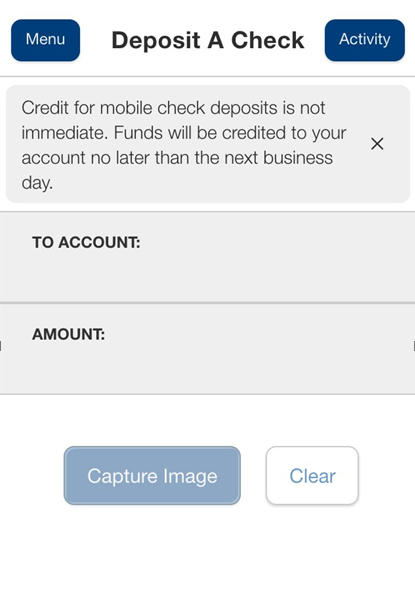
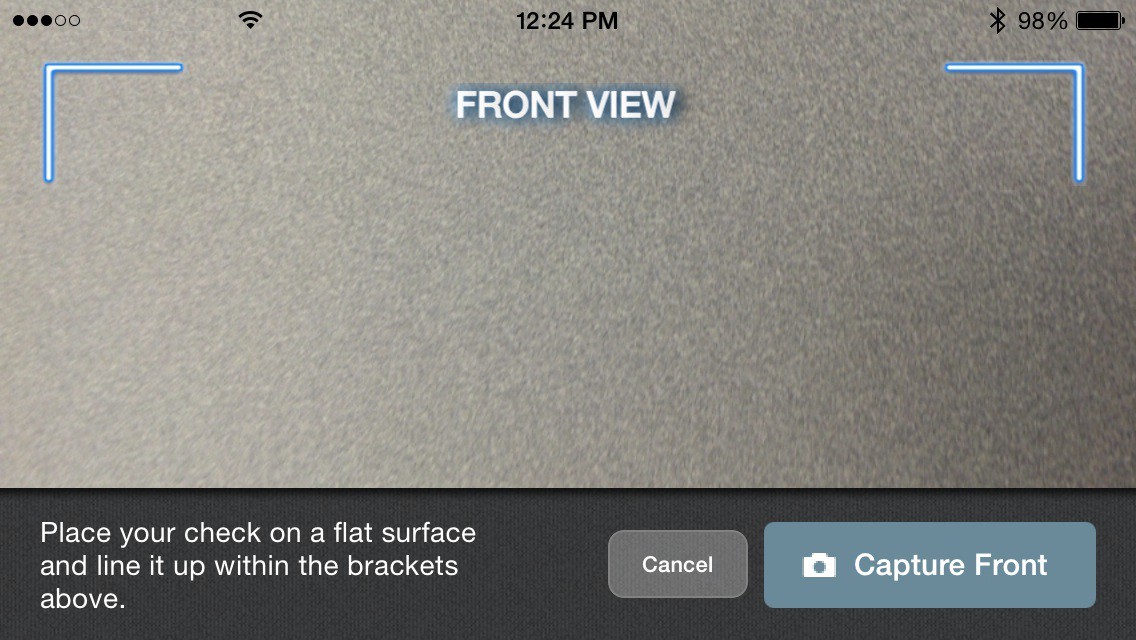
At this point, you’re ready to take a picture of your check for mobile deposit. There are guides on the screen that will help you align the check for the image. Tap Capture Image to use your device to take a picture of the front and back of the check, then tap Deposit.
Deposit a Check Front View
Deposit a Check Back View
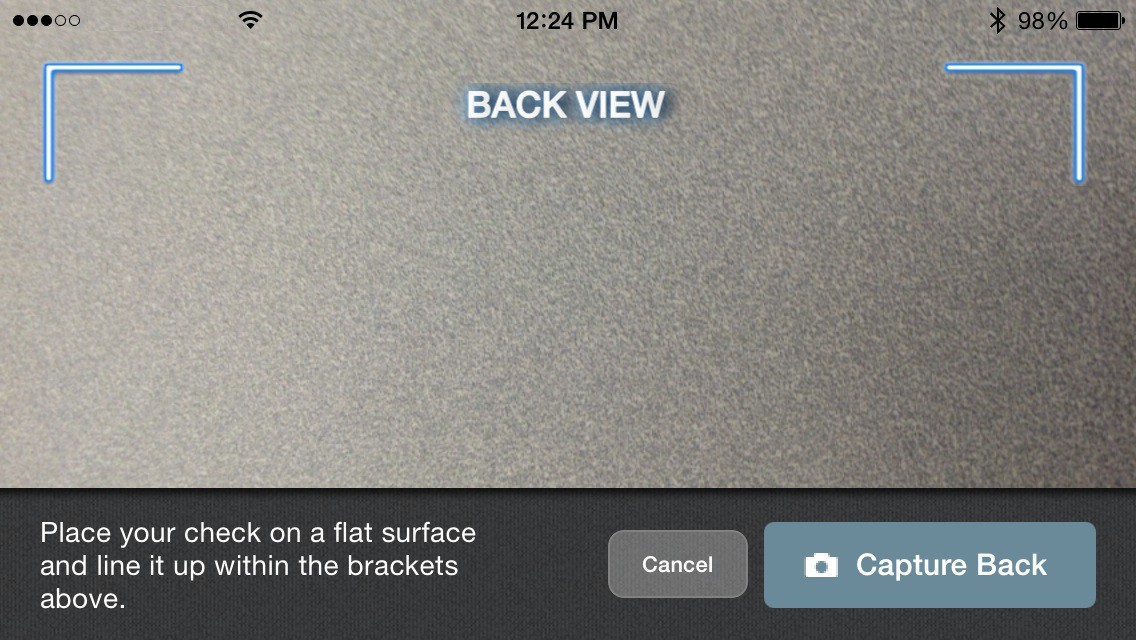
If you find the image of the check is blurry, you can tap Retake Front or Retake Back to take a new picture. Here are some helpful tips:
- Place the check flat on a plain dark background
- Ensure nothing is obstructing the MICR line of your check (the group of three numbers, which are the check number, account number, and bank routing number)
When you’re happy with the image, tap Close and the check will appear in the submitted list in the Deposit Check History list.
Credit for mobile check deposits is not immediate. Funds will be credited to your account no later than the next business day.
View Past Mobile Deposits
You can view a history of your mobile check deposits just below the option to submit a mobile deposit in the Hills Bank mobile app. If you're logged into Hills Bank Online through an internet browser, you can see a history of your mobile check deposits on the right side of the home dashboard.
Did you know that we also offer text banking? Learn more about all the convenient mobile banking features Hills Bank has to offer.
How long until funds from a mobile deposit are available?
Credit for mobile check deposits isn't immediate – a hold may be placed, and funds will be credited to your account no later than the next business day. You'll receive an email when the check has been initially accepted, and another when it is deposited into your account. You’ll also receive a notice if a hold is placed on the check or if it is declined. Hang onto the paper check until the funds post to your account, then you can safely destroy it.
Email notice is sent when the image is accepted and then when the deposit is processed. Email notice is also sent if a hold is placed or the item is declined.
How can I pay bills through Hills Bank Online?
You can make bill payments through Bill Pay, a free service available for customers using Hills Bank Online. To use Bill Pay:
- Log into your online banking account to access the Hills Bank Online dashboard
- Click Pay/Transfer on the navigation bar, followed by Visit Bill Pay Site
- Complete the enrollment process
How can I see my transaction history?
To see your transaction history or verify a transaction was successful, simply log into Hills Bank Online and select the relevant account, where you’ll see a list of recent transactions. You may also review active account transfers within the Activity Center, accessed from the menu within Hills Bank Online.
Any pending transactions will be listed first, followed by the most recent successful transactions.
Please note: you are able to view the past 18 months worth of transactions within Hills Bank Online. If you need to verify a transaction prior to this time frame, please contact our Customer Contact Center at 1-800-445-5725 (1-800-HILLSBK)
- Customer Contact Center hours: Monday – Friday, 7 a.m. – 6 p.m.; Saturday, 8 a.m. – noon
You can also get help directly from a banker by clicking the chat bubble on hillsbank.com or the Hills Bank mobile app.
Haven't signed up for Hills Bank Online yet?
Hills Bank Online is easy to use and give you greater control of your finances, while providing convenience and security with access to your accounts 24/7. Learn more and sign up today.
Hills Alerts
Account notifications by email or text message with Alerts
Sign up today!
Customize your Hills Alerts by setting notifications for the following:
- Deposit Hold Placed
Receive an alert when a hold is placed on a deposit and funds are not immediately made available for reasons such as: stop payments, the account is closed, the check is incomplete, or potential fraud. - Deposit Hold Released
Receive an alert when deposits placed on hold have been released and funds are available. It is recommended to enroll in "Deposit Hold Deleted" when signing up for this alert. - Deposit Hold Deleted
Receive an alert when a deposit hold is deleted ahead of schedule. It is recommended to also enroll in "Deposit Hold Released" when signing up for this alert. - Direct Deposit
Receive an alert for ACH direct deposits in any checking or savings account linked to your name and TIN/Social Security Number. Exceptions for these types of deposit alerts would be checks or debit card credits. - Loan Payment Past Due
Receive alerts for loan payments linked to your name and TIN/Social Security Number when they are 10 days past due. - Negative Balance
Receive an alert when your balance falls below zero in any checking or savings account linked to your name and TIN/Social Security Number. The alert will continue on a daily basis every day your account is negative.
Enroll below and set your notification preferences by selecting email notifications, text notifications, or both!
SMS alerts will come from 473-34. To stop all SMS alerts, type STOP to 473-34. Email alerts will come from alerts@hillsbank.com, and voice will come from 1-833-610-9699. You may change your alerts or unenroll any time by logging in above and checking or unchecking your preferences.
You are enrolling in Hills Alerts to receive personalized financial notifications, which will be sent to the phone number and email address listed under your account. We recommend verifying this information before you enroll. If your email address or phone number changes, you will need to inform Hills Bank of that change to continue receiving alerts.
Some alerts may include information about your financial accounts, products, and services, such as an account balance. For privacy, do not use email accounts accessible by others. Any time an alert contains your account balance, keep in mind that it may not reflect all transactions, including recent debit card transactions or checks you have written.
Hills Bank does not guarantee the delivery of any alerts or the accuracy of the contents within them. You understand and agree that any alerts provided to you may be delayed or prevented due to service outages affecting your phone, wireless, or internet provider, technology failures, and/or system capacity limitations. By enrolling in Hills Alerts, you agree that Hills Bank will not be liable for losses or damages resulting from: (i) non-delivery, delayed delivery, or wrong delivery of any alert; (ii) inaccurate content in any alert; or (iii) your use of, or reliance on, the contents of any alert for any purpose.
You may customize, stop, or suspend alerts at any time. Either you or Hills Bank may terminate your use of alerts at any time without notice. There is no charge for alerts from Hills Bank, but message and data rates may apply.
Hills Bank Online Account Alerts
Are you enrolled in Hills Bank Online? If so, you have access to a variety of alerts and notifications to help you protect your finances and stay up-to-date on account information.
When an alert is triggered, we’ll send a message to the email address or phone number on your account. Here are a few situations that can result in an alert:
• Negative balance
• Check/direct deposit posted
• Loan payment past due
• Transfer from one account to another
• Failed login attempt
To change your alert settings, log into Hills Bank Online on your computer or mobile device and select Features followed by Alerts. Next to Alerts, you can also set up Notifications for additional ways to stay informed on your account.
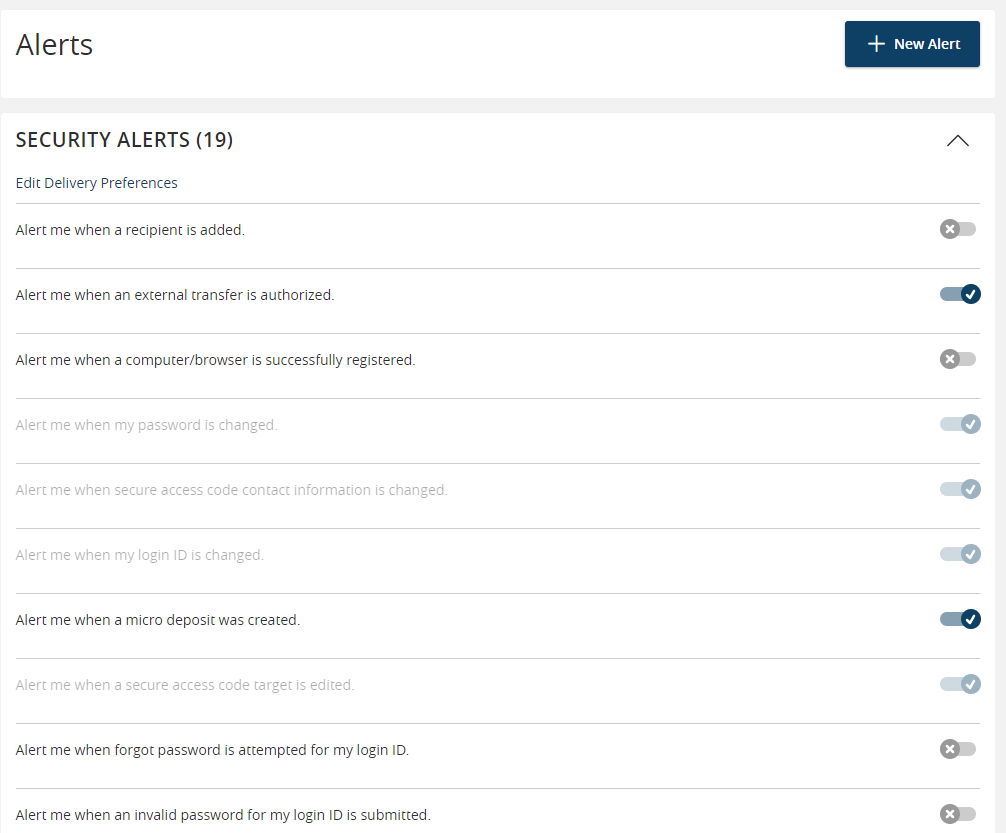
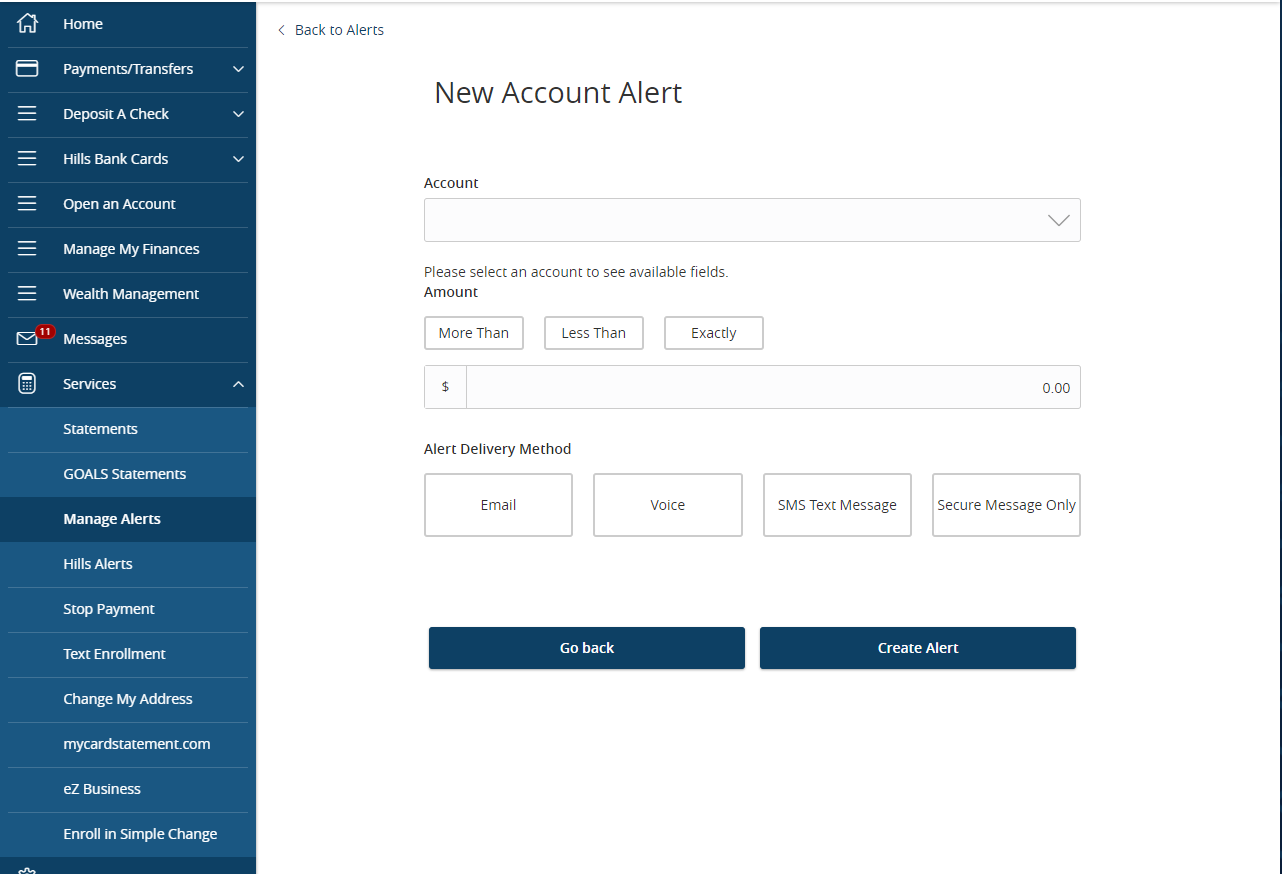
You can even set up custom alerts to trigger when your account reaches a specific dollar amount. Select the +New Alert button from the Alerts page to get started.
You can enroll in Hills Bank Online here.
How do I access online banking in Spanish?
You can access Hills Bank Online in Spanish on your internet browser or Hills Bank mobile app by following these steps:
- Login and select Profile from the menu.
- Select Languages and Themes
- Click the dropdown menu under Language and select “Spanish.”
Your interface will change to Spanish instantly!
If you have any other questions about our online banking features, please reach out via the chat bubble on hillsbank.com or in the Hills Bank mobile app.
Payments, Transfers, & Checks
How do I transfer money into a different Hills Bank account?
Through Hills Bank Online, you can transfer funds between your own Hills Bank accounts or to another Hills Bank customer. Here’s how:
- Log in to Hills Bank Online or the Hills Bank mobile app
- Select Pay/Transfer
- Choose Transfer Money to move funds between your accounts. Non-Hills Bank accounts that you’ve linked here will start with EXTERNAL – so make sure you double check the account(s) you’ve selected before making a transfer.
- Choose Pay Hills Bank Customer to send funds to someone else with an online banking account with us You'll their email address and the last 4 digits of their account number.
You can set up both one-time and recurring transfers through this menu.
If you have any questions, please get in touch with us:
- Connect with a banker by clicking the chat bubble on hillsbank.com or in the Hills Bank mobile app
- Call our Customer Contact Center at 1-800-445-5725 (1-800-HILLSBK) from Monday – Friday, 7 a.m. – 6 p.m.; Saturday, 8 a.m. – noon
- Visit a Hills Bank office near you
How do I transfer money into an external account?
To transfer money to an external (i.e. non-Hills Bank) checking or savings account, log in to your online banking account and select Pay/Transfer on the navigation menu, followed by Transfer Money. You can also transfer money between your accounts at Hills Bank, depending on the account type(s).
If you haven't yet set up the new external account you wish to use, select Pay/Transfer from the menu followed by Add My External Account. You will need the account and routing number of the account you wish to add.
Make Changes to Payments
You can review, edit, and cancel pending or scheduled/recurring transfers using the Activity Center in Hills Bank Online. Select the Pay/Transfers tab followed by Activity Center to see a breakdown of your previous transfers, as well as those that have yet to process or are scheduled to send on a future date. To edit recurring items, click Recurring Transactions at the top of the Activity Center followed by the three stacked dots to the right. You cannot make edits to pending transactions.
Click the "Actions" menu on the right side of a transaction to view more details, edit the next payment in a recurring series, or even send a transaction inquiry if something doesn't look right.
Through online banking you can:
- Transfer funds between your own Hills Bank accounts
- Transfer funds to another Hills Bank customer
- Easily transfer one-time, future, or recurring transfers to another Hills Bank customer.
- Transfer funds to another person
- Send a person-to-person transfer without knowing their account information. All you need is their email address.
Haven’t signed up for Hills Bank Online yet?
Hills Bank's online banking, bill payment, and mobile banking are easy to use and give you greater control of your finances, while providing convenience and security with access to your accounts 24/7.
To learn more about the convenience of banking online, please refer to our Hills Bank Online page.
Sign up for Hills Bank Online today! Click here.
How do I sign up for direct deposit?
Your employer or the government agency that issues your payroll checks is responsible for establishing direct deposit on your behalf. You will typically fill out a basic form requesting the following information, and they will do the rest.
- Bank routing number: 073913755
- Account number: You can find your account number on your checks, or your print or electronic statements. To access your electronic statements:
- Log into Hills Bank Online
- Open the "Services" tab on the left-hand navigation bar
- Click on "Statements" to see a list of your monthly electronic statements
- A voided check or deposit ticket to verify the routing and account numbers
- The address of your financial institution
When will my direct deposit be available on pay day?
Your direct deposit is typically available no later than 9:00 a.m. on the deposit date specified by your employer.
You can check your available balances easily by logging into Hills Bank Online through your internet browser or via the Hills Bank mobile app.
Haven't signed up for Hills Bank Online yet?
Hills Bank Online is easy to use and gives you greater control of your finances, while providing convenience and security with access to your accounts 24/7.
Learn more and enroll in Hills Bank Online today!
How to Make a Loan Payment in Hills Bank Online
Here’s how to make a loan payment in Hills Bank Online. Under the navigation menu, select Payments/Transfers, then select Loan Payment. Choose the account you would like to pay from and the loan account that you would like to apply the payment. Then you can choose what type of payment you would like to make, the amount, and the payment date. If you would like to make this a recurring transfer, you can check the box to do so. Just select how often you want the transaction to repeat, and when you would like it to stop. Then select save. Lastly, you have the option to fill out the memo line if you would like to. Then select continue.
If you have any other questions on loan payment or other things in online banking, give a us a call at 1-800-445-5725, or chat directly with a banker by selecting the chat bubble in the bottom right of your screen!
How can I make credit card payments?
There are a number of convenient ways you can make Hills Bank credit card payments:
- Pay online or from your mobile device with Hills Bank Online
- To make Hills Bank credit card payments online, log in and select Pay/Transfer followed by Pay Hills Bank Credit Card.
- You cannot make a direct payment with an external account. If you need to do so, please get in touch with us for assistance.
- Enroll your card on https://www.mycardstatement.com to access card information and make payments.
- Pay over the phone or live chat by calling our Customer Contact Center at 1-800-445-5725 (1-800-HILLSBK) or clicking the chat button on hillsbank.com or the Hills Bank mobile app.
- Mail payments to:
Attn: Mail Teller
Hills Bank and Trust Company
PO Box 160
Hills, IA 52235-9989
If you would like to make payments on a credit card from a different institution, you may do so through our convenient Bill Pay service.
Sign up through Hills Bank Online by logging into your online banking account and selecting Payments/Transfers, followed by Pay My Bills. Then simply complete the enrollment process.
Questions?
- Chat: Click the chat bubble on hillsbank.com or in the Hills Bank mobile app to connect with a banker during business hours.
- Call: Reach our Customer Contact Center at 1-800-445-5725 (1-800-HILLSBK), Monday – Friday, 7 a.m. – 6 p.m.; Saturday, 8 a.m. – noon.
- Stop by: Visit any Hills Bank location near you.
You would make a credit card payment by going to Pay/Transfer and Pay Hills Bank Credit Card. You cannot make a payment directly to a credit card or loan from an external account.
How can I make a loan payment to another lender online?
Using the Pay My Bills feature in Hills Bank Online, you can quickly and easily set up recurring payments from your Hills Bank account to loans you have taken out with other financial institutions. After logging in to Hills Bank Online through your internet browser or the Hills Bank mobile app, use the navigation menu to select Pay/Transfer followed by Visit Bill Pay Site.
You can also use external transfers to move funds between your deposit accounts at Hills Bank and other financial institutions. To set up an external transfer, navigate to Pay/Transfer followed by Add My External Account and follow the instructions. You will be sent micro payments that are used to verify the account. Once you’ve received them, you’ll need to select Verify My External Account to finalize the process.
Transfers to other financial institutions may not be insured by the FDIC.
How do I reorder checks?
You may reorder checks in Hills Bank Online. Just select Features followed by Check Reorder.
You can also order new checks online through our partner, Deluxe, or visit any of our branch locations for assistance.
You can also order checks by calling our Customer Contact Center at 1-800-445-5725 (1-800-HILLSBK)
- Customer Contact Center hours: Monday – Friday, 7 a.m. – 6 p.m.; Saturday, 8 a.m. – noon
Please note: check order fees vary by style, and all check orders are subject to IA state sales tax.
Our Gold Checking account is designed for customers who would like to earn interest and features a free introductory pack of checks. Click here for more information, or apply now!
Can I order checks from any company or does it have to be through your vendor?
We have partnered with Deluxe in order to offer a high-quality, convenient, secure option for check ordering. However, you may also order your checks from another vendor of your choice.
Need to reorder checks? Browse from several styles and reorder your checks online through Deluxe.
How can I get a copy of a canceled (cleared) check?
A canceled check is a check which has cleared the depositor's account and has been paid by the bank. Copies of canceled checks can be used as proof of payment, and are accessible for up to 7 years.
Our personal checking accounts offer your choice of statement image (with returned check images), free safekeeping of canceled checks*, or electronic statements in Hills Bank Online. You can also view images of checks by logging into your account using Hills Bank Online and searching for the transaction in your transaction history. When you click on the check number, you will be able to view and print a copy of the cleared check.
If you are unable to see the check online or you do not use online banking, we can help:
Questions? We’re here to help.
- Chat: Click the chat bubble on hillsbank.com or in the Hills Bank mobile app to connect with a banker during business hours.
- Call: Reach our Customer Contact Center at 1-800-445-5725 (1-800-HILLSBK), Monday – Friday, 7 a.m. – 6 p.m.; Saturday, 8 a.m. – noon.
- Stop by: Visit any Hills Bank location near you. If you are unable to see the check online or you do not use online banking, you may also call our Customer Contact Center at 1-800-445-5725 (1-800-HILLSBK)
- Customer Contact Center hours: Monday – Friday, 7 a.m. – 6 p.m.; Saturday, 8 a.m. – noon
Otherwise, you can visit any of our branch locations to request a copy of a canceled check.
If you utilize a check safekeeping system or any other system offered by us for the retention of your checks, you understand that the canceled checks will be retained by us and destroyed after a reasonable time period or as required by law. Any request for a copy of any check may be subject to a fee, as indicated in the Fee Schedule or Disclosures and as allowed by law. If for any reason we cannot provide you with a copy of a check, our liability will be limited to the lesser of the face amount of the check or the actual damages sustained by you.
How do I send or receive wire transfers?
Please note: Hills Bank requires an in-person signature to initiate wires. Wires are processed Monday through Friday. Requests must be completed and submitted by 3:00 p.m., or they may not be processed until the following business day.
To complete an incoming wire, provide the sender with the following:
- Routing number
- 073913755
- Bank Name
- Hills Bank and Trust Company
- PO Box 160
- Hills, IA 52235
- Your account numbers
- Name and address on your account.
To complete an outgoing wire outside the US, visit a Hills Bank location and provide the following:
- Receiving country
- Currency type (if applicable)
- Name and address of the receiving bank
- SWIFT number of receiving bank
- IBAN account number at receiving bank
- Name and address of receiving account
- Sort Code (United Kingdom only)
- CLABE number (Mexico only)
- 9-digit Transit number (Canada only)
View the current fees for wire transfers
If you have any questions about wiring funds, please contact Hills Bank.
Questions? We’re here to help.
- Chat: Click the chat bubble on hillsbank.com or in the Hills Bank mobile app to connect with a banker during business hours.
- Call: Reach our Customer Contact Center at 1-800-445-5725 (1-800-HILLSBK), Monday – Friday, 7 a.m. – 6 p.m.; Saturday, 8 a.m. – noon.
- Stop by: Visit any Hills Bank location near you.
What is an IBAN and is it required for international transfers?
The International Bank Account Number (IBAN) is an international standard of identifying bank accounts. These numbers are used when making or receiving international payments.
The IBAN varies by country/institution, and does not replace your account number. Only the institution servicing an account can provide the correct IBAN of that account and it must be obtained from the beneficiary of the wire. An IBAN is required for beneficiary accounts in Europe and other countries around the world.